LearnDash Groups Plus Customization: Helping Group Leaders Manage Students from the Frontend

We customized LearnDash Groups Plus for a US-based healthcare training company, adding LearnDash frontend customization features that gave Group Leaders greater control over student learning, enrollment, and assessments. The solution enabled teachers to bulk enroll students, assign specific quizzes based on individual performance, and review and grade essay and audio-based questions without giving them access to the WordPress backend.

Client Background & Requirements

Our client is a US-based educational company specializing in nurse training and healthcare education. As their online learning platform grew, they needed a more efficient way for instructors to manage students and assessments without exposing the WordPress administration area.

The client had two key requirements. 

  • First, they wanted to simplify group registrations in LearnDash and improve LearnDash student management, allowing Group Leaders to manage student enrollment within their assigned groups. 
  • A particularly important requirement was giving teachers control over which quizzes individual students could access, as well as letting teachers manage quiz responses from the frontend.

How We Provided the Solution?

We built the solution using LearnDash LMS and the LearnDash Groups Plus plugin, extending its existing functionality through LearnDash customization, custom frontend features, and shortcodes.

1. LearnDash Frontend Quiz Assignment Functionality

The first requirement was to give Group Leaders the ability to bulk enroll students in LearnDash into a LearnDash Group (Classroom). We installed and configured LearnDash Groups Plus to support the required group management workflow.

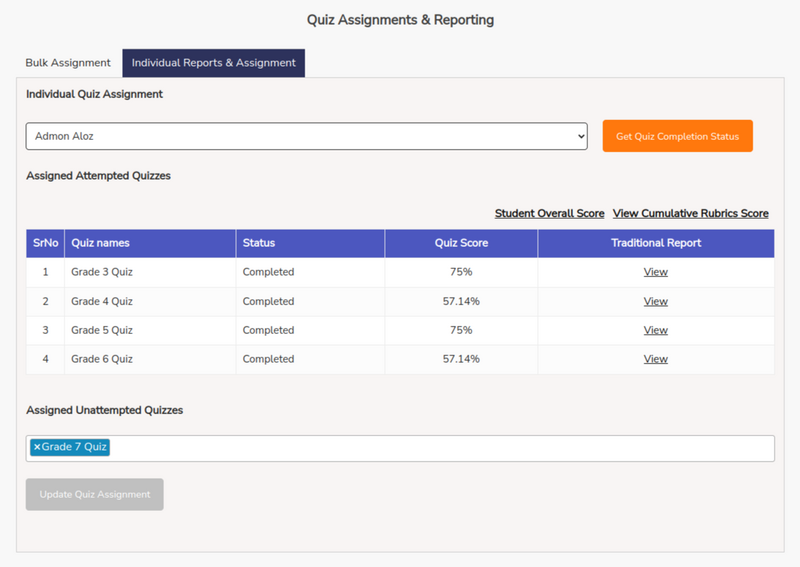
The client then requested a more advanced feature that would allow teachers to assign quizzes to individual students in LearnDash according to their performance. For example, a teacher could assign a more challenging quiz to a student who was progressing well or provide an easier assessment to a student who needed additional practice.

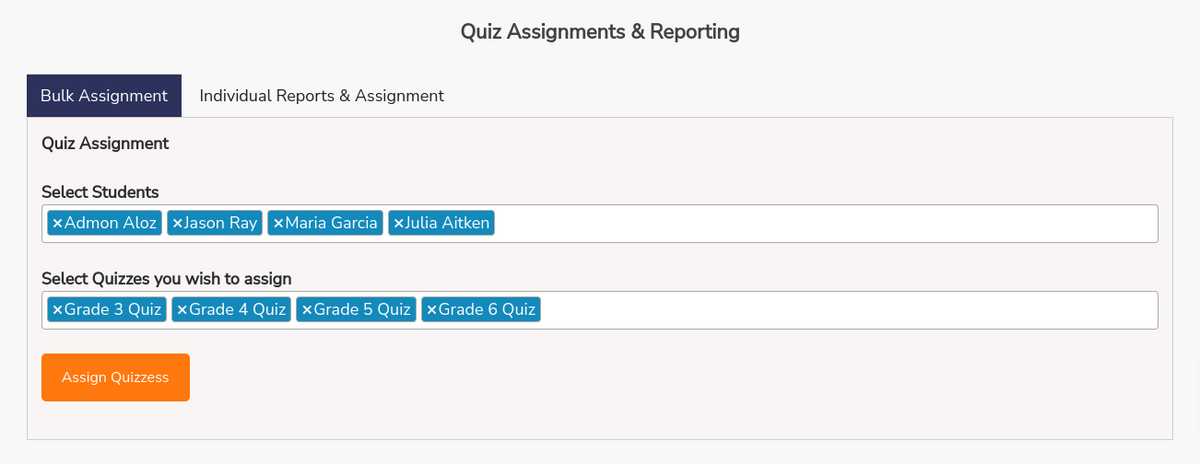
The frontend interface provides Group Leaders with two multi-select dropdowns. The first contains the students enrolled in the selected group, while the second displays the quizzes available through the courses associated with that LearnDash group.

After selecting the required students and quizzes, the teacher can click “Assign Quizzes” to assign the selected assessments to those students. This allows teachers to manage quiz assignments directly from the dashboard and dynamically add quizzes to student courses, making the process significantly more efficient when working with multiple students.

Student-Specific Quiz Access in LearnDash

We also customized how assigned quizzes are made available to students.

The quizzes assigned to each student are stored against their user profile, and only the quizzes specifically assigned to that student are made available for them to attempt.

This gave teachers much greater control over the assessment process. Rather than allowing every student enrolled in a course to access the complete set of quizzes, instructors could determine exactly which assessments each student should take. This approach was particularly useful for the client’s personalized learning workflow, where quiz difficulty could be adjusted according to individual student performance.

Looking for custom group management features in the LearnDash plugins?

Hire a LearnDash Developer Now

2. LearnDash Frontend Essay and Audio Question Review

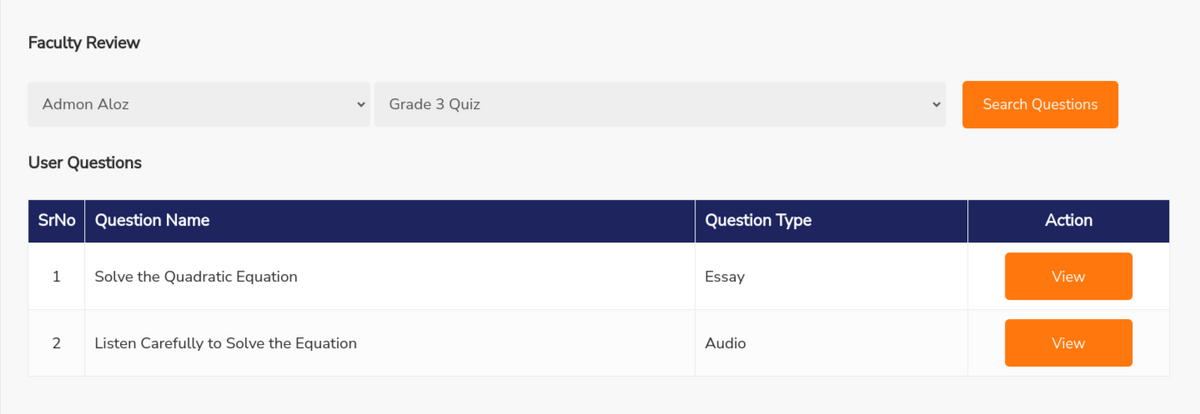
In addition to quiz assignment, the client needed a way for teachers to review and grade essay and audio questions from the frontend. We developed a dedicated review interface where a Group Leader can first select a student from their group. The teacher can then select one of the quizzes assigned to that student.

Once the selections are made, the interface displays the relevant essay and audio questions attempted by the student. The teacher can open individual responses, review the submission, and assign a grade directly from the frontend. This removed another major dependency on the WordPress backend and gave instructors a more focused interface for reviewing subjective assessment responses.

Feedback and Comment Notifications

For essay-based questions, we also added a comments and feedback functionality that allows teachers to leave comments for students directly alongside their responses. To make communication more effective, we implemented email notifications for comment activity. Teachers and students are notified when comments are added, helping ensure that feedback does not go unnoticed.

This created a more interactive assessment workflow where students could receive instructor feedback and teachers could communicate with learners without relying on separate communication channels.

Result

The customization transformed LearnDash Groups Plus into a more tailored frontend management system for the client’s healthcare training platform.

Group Leaders can now manage key aspects of their groups without requiring access to the WordPress backend. They can bulk manage students, assign quizzes based on individual performance, control student-specific quiz access, review essay and audio responses, grade submissions, and provide feedback from the frontend.

By extending LearnDash Groups Plus with custom functionality, we were able to create an assessment workflow that better matched the client’s nurse training and personalized learning requirements while keeping the instructor experience simple and focused.