


LearnDash Quiz Customization: Adding a Math Equation Editor, Drawing & Accessibility Tools

We customized LearnDash Quiz to create a more interactive and accessible assessment experience, extending its capabilities with specialized tools for mathematical input, visual responses, calculator use, and personalized quiz accessibility.

Client Background & Requirements

Our client is an education company based in New York, US, specializing in state-specific diagnostic assessments and digital courses designed around individual state educational standards. The company was already using LearnDash for its digital learning and assessment platform but needed additional functionality that was not available in the standard LearnDash quiz.

The client wanted students to be able to work with mathematical expressions, provide drawing-based responses, and use calculators during assessments. They also wanted accessibility options that would allow students with special needs to customize the way quiz content was displayed and presented.

The main requirements included:

  • Math Equation Editor for creating and answering mathematical questions
  • Drawing tool for visual and canvas-based responses
  • TI-108 and scientific calculators
  • Answer masking for multiple-choice questions
  • Text-to-speech functionality
  • Dark contrast mode
  • Custom background color schemes

Instead of replacing LearnDash quiz, we developed custom functionality around the existing quiz system to accommodate these requirements.


How did we provide solution?

Our approach combined an existing mathematical input library with custom development for the drawing, calculator, and accessibility requirements.

  • For the Math Equation Editor, we selected the MathType library because it supported the mathematical notation and formulas required for students from Grade 1 through Grade 8.
  • The drawing and accessibility features were developed as custom LearnDash functionality and integrated into the quiz experience.
  • This approach allowed the client to retain LearnDash as the foundation of its assessment platform while extending the quiz interface to support more specialized educational requirements.

1. Math Equation Editor for LearnDash Quiz

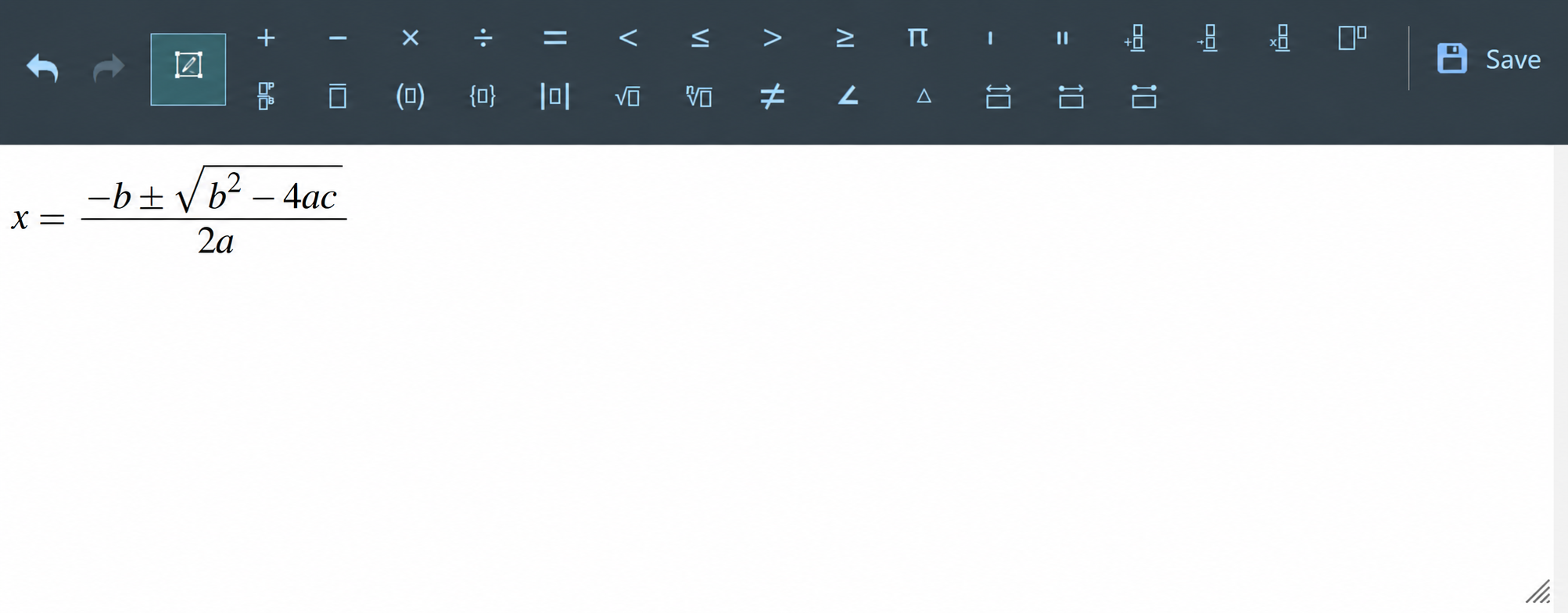
Students often need to enter fractions, mathematical symbols, formulas, and other expressions that cannot be represented effectively through a standard text field. As part of our LearnDash quiz customization, we integrated the MathType library to provide a dedicated Math Equation Editor (MEE).

The editor could be used by instructors when creating mathematical questions and by students when entering their answers. The supported notation covered the equations and formulas required for the client’s Grade 1 to Grade 8 assessments. We also customized the integration to closely replicate the look, feel, and functionality of the Math Equation Editor used in the current version of the New York State Testing Program.

This gave students a familiar interface for entering mathematical responses while allowing the assessment platform to handle more complex mathematical notation.

Screenshot – Math Equation Editor

2. Custom Drawing Tool for Quiz Answers

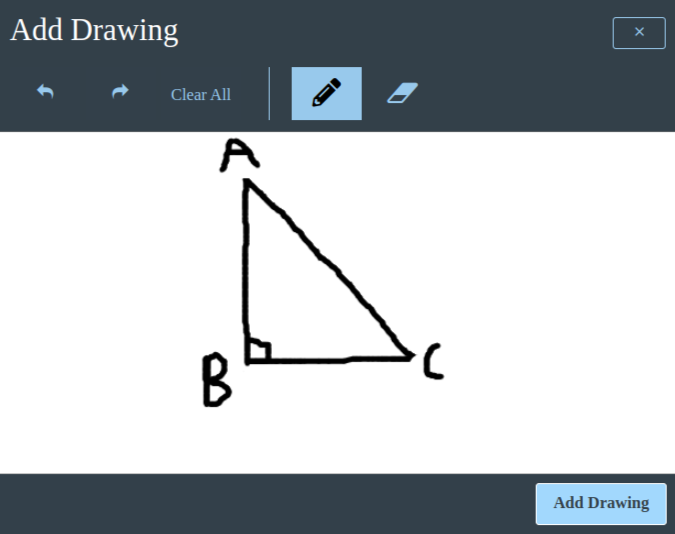
Not every assessment question can be answered effectively with text. Students may need to draw shapes, objects, diagrams, or other visual responses. To support these assessment types, we developed a custom drawing tool as part of the LearnDash quiz customization. Students can switch to canvas mode directly within a question and use the drawing interface to create their responses. The tool allows them to:

  • Draw directly on the canvas
  • Erase parts of a drawing
  • Clear the entire canvas
  • Submit the drawing along with their quiz response

When the student completes the quiz, the drawing is saved as an image. The saved response is then available to instructors when they review the student’s answers from the backend. This allowed the client to support drawing-based assessment questions without requiring students to leave the LearnDash quiz interface.

Screenshot – Drawing Tool

3. Calculator Integration

Some assessments require students to use specific calculators rather than external applications or unrestricted online tools. We therefore integrated TI-108 and scientific calculators into the LearnDash course environment.

To give instructors control over calculator availability, we created a custom field at the course level. The instructor can select which calculator students should have access to, and the selected calculator becomes available during the relevant quiz.

Need LearnDash Quiz Customization for Your LMS?

Contact Us Today!

4. Accessibility Tools in LearnDash Quiz

Accessibility was a major component of this LearnDash quiz customization project. The client wanted students with different learning needs to have greater control over the presentation of quiz content.

We developed four accessibility features to help students customize their assessment environment.

  • Answer Masking
    Multiple-choice questions typically display every answer option at once. For some students, seeing all of these options simultaneously can make the assessment interface overwhelming. We customized the LearnDash quiz to hide answer options by default. A student can then click the visibility icon next to an individual option to reveal it. This gives students control over how much information they see at a time while preserving the original multiple-choice question format.
  • Text-to-Speech
    We implemented text-to-speech functionality using the Google API. Students can select text within the quiz and have the selected content read aloud. This provides an alternative way to access written assessment content and adds an audio-based interaction to the quiz experience.
  • Dark Contrast Mode
    We also introduced a dark contrast setting for students who benefit from a high-contrast interface. When enabled, the quiz transitions from the standard bright LearnDash appearance to a black-and-white presentation, with a black background and white text. The setting changes the visual presentation of the quiz while leaving the underlying assessment content unchanged.
  • Custom Background Colors
    In addition to dark contrast, students can select alternative background and text combinations. The customized quiz supports options such as:

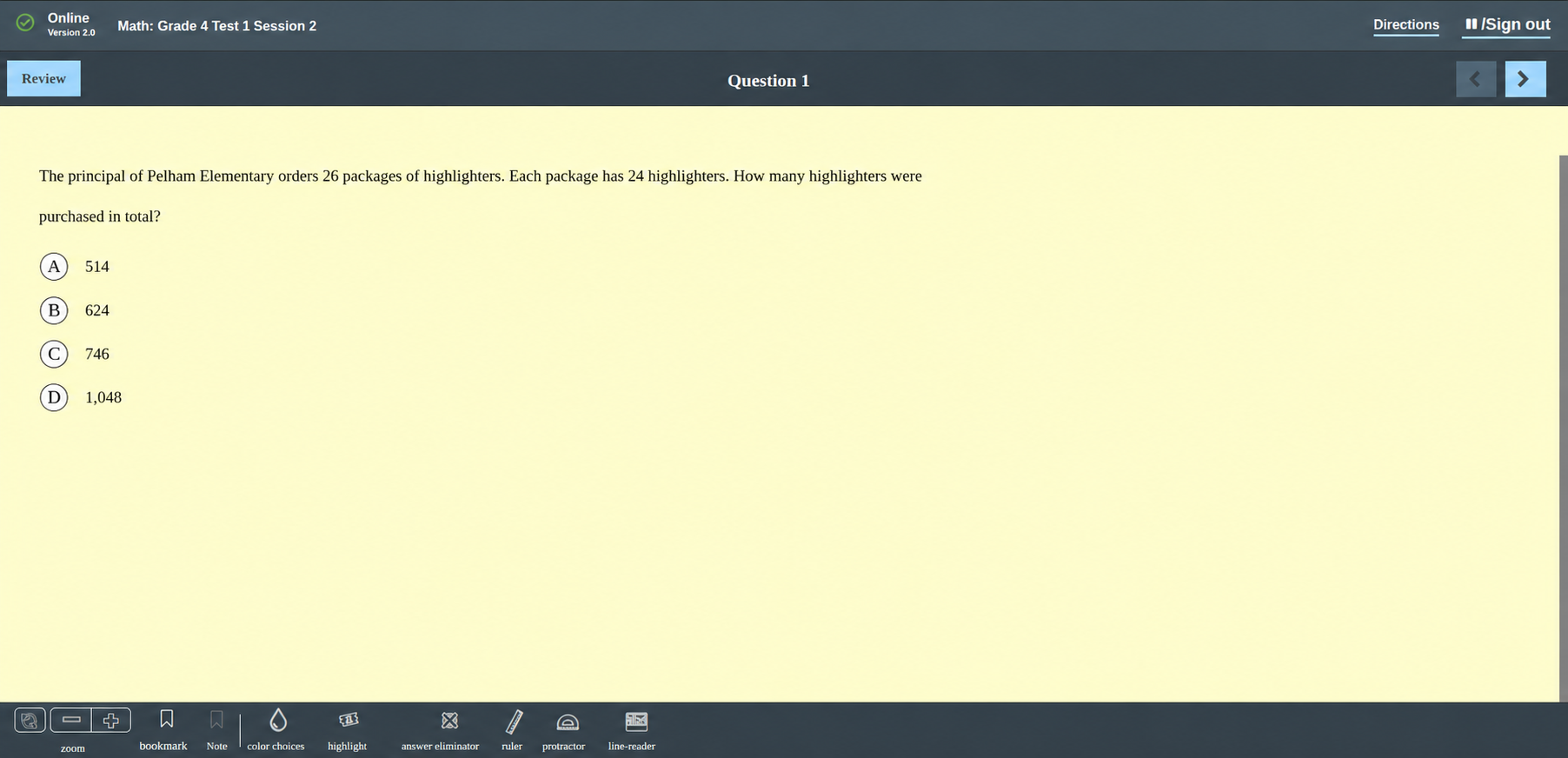
    • Yellow background with black text
    • Pink background with black text
    • Blue background with black text

    These options allow students to choose a visual presentation that better suits their individual requirements.

Accessibility-color

Screenshot – Yellow Contrast

The Result

The completed LearnDash quiz customization extended the platform beyond standard quiz functionality and gave the client a more flexible environment for delivering state-specific assessments.

Instructors could create mathematical questions using a dedicated equation editor, while students could respond using mathematical notation or drawings when required. Calculator options provided access to approved tools, and accessibility controls gave students greater flexibility over how questions were displayed and presented.

The solution also kept these capabilities within the existing LearnDash workflow. Students did not need to rely on separate applications for mathematical input, drawing, or several assessment-related tools. For instructors, responses such as student drawings were retained as part of the quiz record and could be reviewed through the LearnDash backend.

Conclusion

A standard quiz setup may not always provide the tools required for specialized educational assessments. Through custom LearnDash quiz development, it is possible to extend the existing LMS while maintaining the core LearnDash assessment workflow. For this education company, we combined a MathType-powered equation editor, custom drawing functionality, calculator integration, and accessibility controls to create a more adaptable quiz environment.

The project demonstrates how LearnDash quiz customization can support complex mathematical assessments, visual responses, controlled assessment tools, and accessibility requirements within a single learning platform.